What you will learn
- Search by NAICS and PSC codes first, keywords second. Codes are how the government classifies work; keywords are how it happens to be described.
- The notice type tells you where the buy is in its life. Sources Sought and Presolicitation notices are where you can still influence the requirement.
- Set-aside filters are eligibility filters. If you are not in the set-aside category, the notice is not an opportunity, however good the fit.
- Save searches and check them daily. Response windows for full solicitations are often 30 days, and 10 to 15 days for simplified acquisitions.
- Read the attachments before you read the description. The Statement of Work and Section L are where the real requirement lives.
Chapter 01of 061 min
What SAM.gov is, and what it is not
SAM.gov (the System for Award Management) is the single government-wide point of entry for federal contract opportunities. Under FAR 5.101, contracting officers must publicize proposed contract actions expected to exceed $25,000 there, and most agencies post smaller buys too. It is also where your company registers to do business with the government: your Unique Entity ID (UEI), your CAGE code, your size and socio-economic status, and your representations and certifications all live in your SAM registration.
What SAM.gov is not: a complete picture of federal spending. Task orders under existing contract vehicles (GSA Schedules, GWACs like NASA SEWP, agency IDIQs) are usually competed inside those vehicles and never appear as public notices. Some agency-specific portals, such as GSA eBuy or the DLA DIBBS system, carry their own opportunities. Start with SAM.gov because it is free and government-wide, and add the vehicle portals you hold contracts on.
Chapter 02of 061 min
The notice types, and what each one means for you
Every opportunity carries a notice type. It tells you how far along the buy is, and therefore what you can still do about it.
| Notice type | What it means | What to do |
|---|---|---|
| Sources Sought | Market research under FAR Part 10. The agency is asking who can do this work and whether small businesses can. | Respond with a capability statement. Your answer can decide whether the buy is set aside. |
| Presolicitation | The agency intends to issue a solicitation soon and is giving advance notice (FAR 5.204). | Start capture. Ask questions, line up teammates, check eligibility. |
| Solicitation | The RFP, RFQ or IFB is out. The clock is running. | Run bid/no-bid within days, then build the compliance matrix. |
| Combined Synopsis/Solicitation | One notice that is both the announcement and the solicitation, common for commercial items (FAR 12.603). | Treat it as a live solicitation; deadlines are usually short. |
| Special Notice | Industry days, draft RFPs, program announcements. | Attend and comment. Draft RFP comments are your cheapest influence. |
| Award Notice | The contract has been awarded. | Note the winner, value and date for competitive intelligence. |
| Justification (J&A) | Sole-source or limited competition rationale. | Read it to learn who the incumbent is and why competition was limited. |
Chapter 03of 061 min
Search by code, not by keyword
The government classifies every requirement with a six-digit NAICS code (the industry) and a four-character Product Service Code, or PSC (the specific product or service). Keywords are inconsistent: one office writes "cybersecurity support services", another writes "information assurance". The codes do not drift. Build your search around the codes your company is registered under, then layer keywords on top to catch the exceptions.
- 1
List your NAICS codes and their size standards
Your primary NAICS is in your SAM registration. Add every secondary code where you have past performance. Each NAICS has a small business size standard (revenue or employee count) published by the SBA; note which ones you qualify under, because a set-aside opportunity under a code where you are "other than small" is not available to you.
- 2
Map the PSCs your work falls under
PSCs start with a letter for services (for example
Dfor IT and telecom,Rfor professional services) or a number for products. A NAICS such as 541512 (computer systems design) typically pairs with PSCs D302, D307, D310 and D399. Search by both: an office sometimes picks an unexpected NAICS but a predictable PSC. - 3
Add place of performance and agency filters
If you cannot perform in Hawaii, do not spend time on Hawaii. If your relationships are in the Department of Veterans Affairs and the Army, filter to those departments first and widen later. Sub-agency filters (for example, a specific Army command) sharpen this further.
- 4
Filter by set-aside to your eligibility
Total Small Business, 8(a), HUBZone, Service-Disabled Veteran-Owned (SDVOSB), Woman-Owned (WOSB and EDWOSB). Select only the set-asides you hold, plus "no set-aside" full and open buys where your past performance can compete with large businesses.
- 5
Only then add keywords
Use the vocabulary the government uses in Statements of Work: "help desk", "Tier II", "ATO", "PWS". Search a pasted paragraph from a past SOW for the terms it actually contains rather than guessing.
Chapter 04of 061 min
How to read a notice in ten minutes
A notice page has a description, a set of dates, points of contact and, usually, attachments. Experienced capture managers read them in a fixed order so nothing important is missed.
- 1Response date and time, with time zone. Federal deadlines are exact; a submission one minute late is late (
FAR 15.208). Put it in your calendar with the time zone written out. - 2Set-aside and NAICS. Confirm eligibility before reading anything else. Check the size standard for that NAICS against your revenue or headcount.
- 3Notice type. Decide whether you are shaping a requirement or responding to one.
- 4Attachments. Open the Statement of Work or PWS first, then Section L (instructions) and Section M (evaluation factors). The description on the notice is a summary, and summaries hide requirements.
- 5Contracting office and point of contact. Note the office, not just the person. Offices have habits: page limits they favor, evaluation approaches they reuse.
- 6Related notices. Look for an earlier Sources Sought or Presolicitation notice. The responses to those often shaped this solicitation, and the Q&A from them may already answer your questions.
- 7Award history. Search prior awards for the same requirement or office to learn the incumbent, the last award value and the contract type.
Chapter 05of 061 min
Saved searches, alerts and a daily rhythm
The contractors who see opportunities early are the ones who look every day. Build three saved searches and review them each morning: a tight one (your primary NAICS, your set-asides, your agencies), a wide one (all your codes, no agency filter), and an early-warning one (Sources Sought and Presolicitation notices only, no keywords). The early-warning search is the one that finds work six months before the solicitation drops.
A ten-minute daily routine
- Open the three saved searches; triage new notices as pursue, watch or ignore.
- For every "pursue", download the attachments and read the SOW, L and M the same day.
- Log the response date, the Q&A deadline and any site-visit or industry-day date.
- Check amendments on anything already in the pipeline.
- Look at award notices in your codes to keep incumbent and pricing intelligence current.
Chapter 06of 061 min
Beyond SAM.gov: state and local opportunities
State, county and municipal governments do not post to SAM.gov. Each state runs its own procurement portal, and many cities and school districts use regional bid sites. The notice vocabulary differs (RFP, RFQ, IFB, ITB, RFI, ITN) and evaluation is often less formal than federal source selection, but the discipline is the same: read the full solicitation, check eligibility and registration requirements for that jurisdiction, and calendar the deadline with its time zone. If federal work is your base, state work in the same service lines is the most natural expansion because your past performance carries over.
Before you go
Questions people ask
- Do I need to be registered in SAM.gov to search for opportunities?
- No. Searching is public and free. You need an active SAM registration with a UEI to submit a response or receive an award, and registration can take several weeks, so start it before you need it.
- How often are new opportunities posted?
- Continuously, on business days. Federal fiscal year-end (July through September) is the busiest period because agencies obligate remaining funds; expect short response windows then.
- What is the difference between a NAICS code and a PSC?
- NAICS identifies the industry and drives the small business size standard. The Product Service Code identifies the specific product or service being bought. Contracting officers assign both to every requirement, and searching on both finds notices that keywords miss.
- Should I respond to a Sources Sought notice if I am not sure I will bid?
- Usually yes. Your response can lead the agency to set the requirement aside for small business, and it puts your capabilities in front of the contracting officer before the solicitation is written. Keep it short, truthful and specific to the questions asked.
- Can I find who the incumbent is?
- Often. Search award notices for the same requirement, read any Justification and Approval notices, and look at the contract number pattern. The Q&A on the current notice sometimes discloses the incumbent and the current contract value when a bidder asks.
How ProposalWorkspace handles this
Opportunity discovery with a match score
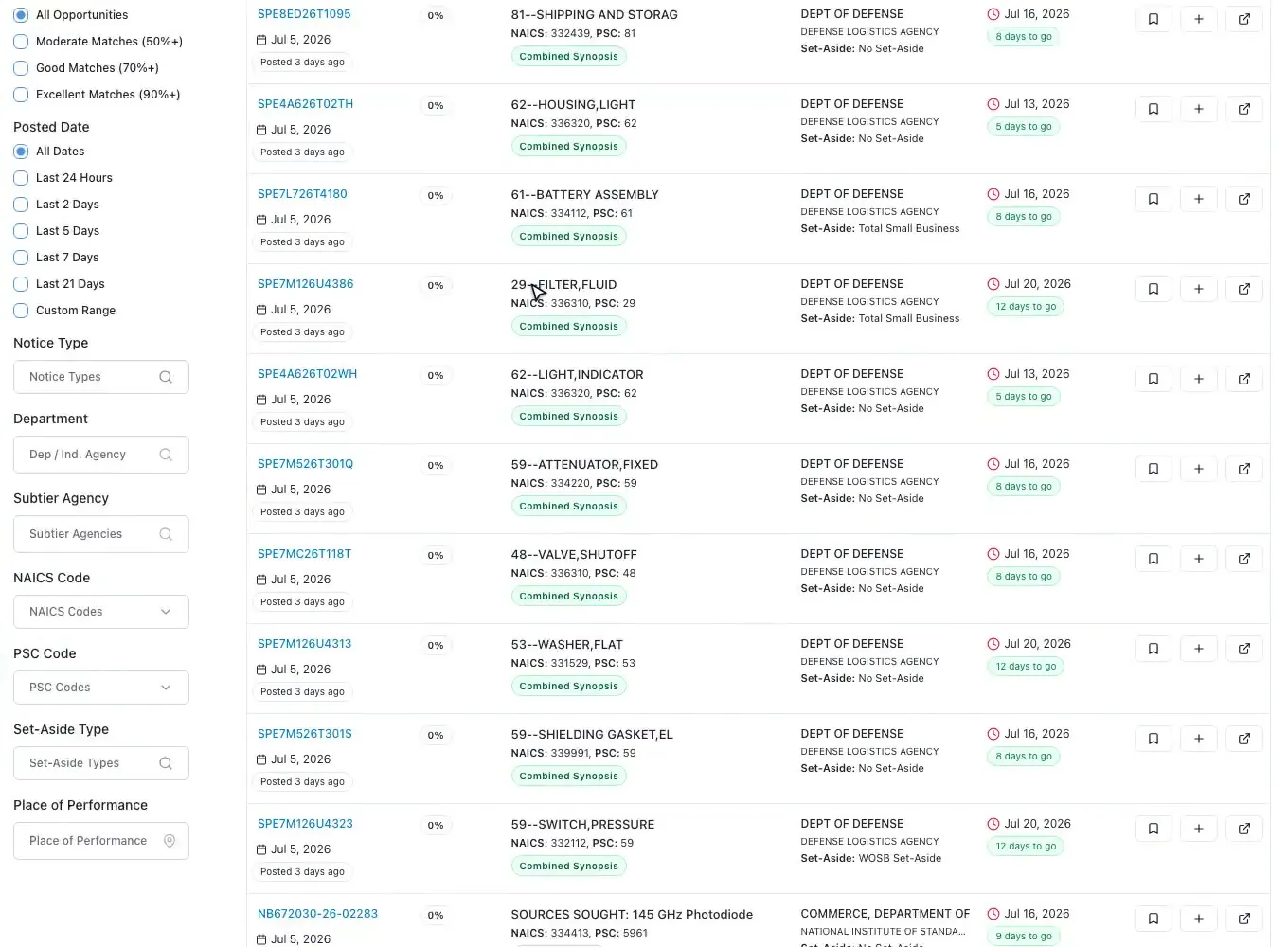
ProposalWorkspace syncs SAM.gov daily and lets you filter by NAICS and PSC trees, set-aside, agency, place of performance and due date, then scores every notice against your own business profile. Save a search as an alert and new matches arrive in a daily briefing email.
Up next
How to find state and local government contract opportunities
State and local governments buy more in total than the federal government, and they do it through fifty different systems, each with its own portal, vocabulary and rules. This guide shows where the work is published, what changes when you leave the FAR behind, and how to track state bids without building a second capture process.
9 min
New proposal guides, by email
One email when we publish a new proposal guide for companies that bid to federal and state agencies, and the occasional product update. No drip campaigns, no sharing your address, unsubscribe with one click.
This guide is general information for federal contractors drawn from the FAR and standard capture and proposal practice. It is not legal advice; always read the specific solicitation and consult counsel on protests, contract terms and compliance questions.