Why ProposalWorkspace

ProposalWorkspace: AI proposal software for federal, state and local bids

By Nazim Nashipudi, Founder Updated

ProposalWorkspace is AI proposal software for companies that bid on federal, state and local government contracts. It finds bids on SAM.gov and state and local feeds, reads the RFP with page citations, builds the compliance matrix and outline from Sections L, M and C, and drafts from your records, showing a gap where they have no evidence. Plans start at $99 a month, billed annually, with a 7-day free trial.

No credit card. Sign up with your company email.

  • Federal, state and local
  • Public prices
  • 7-day free trial, no card
  • Works with your own AI assistant
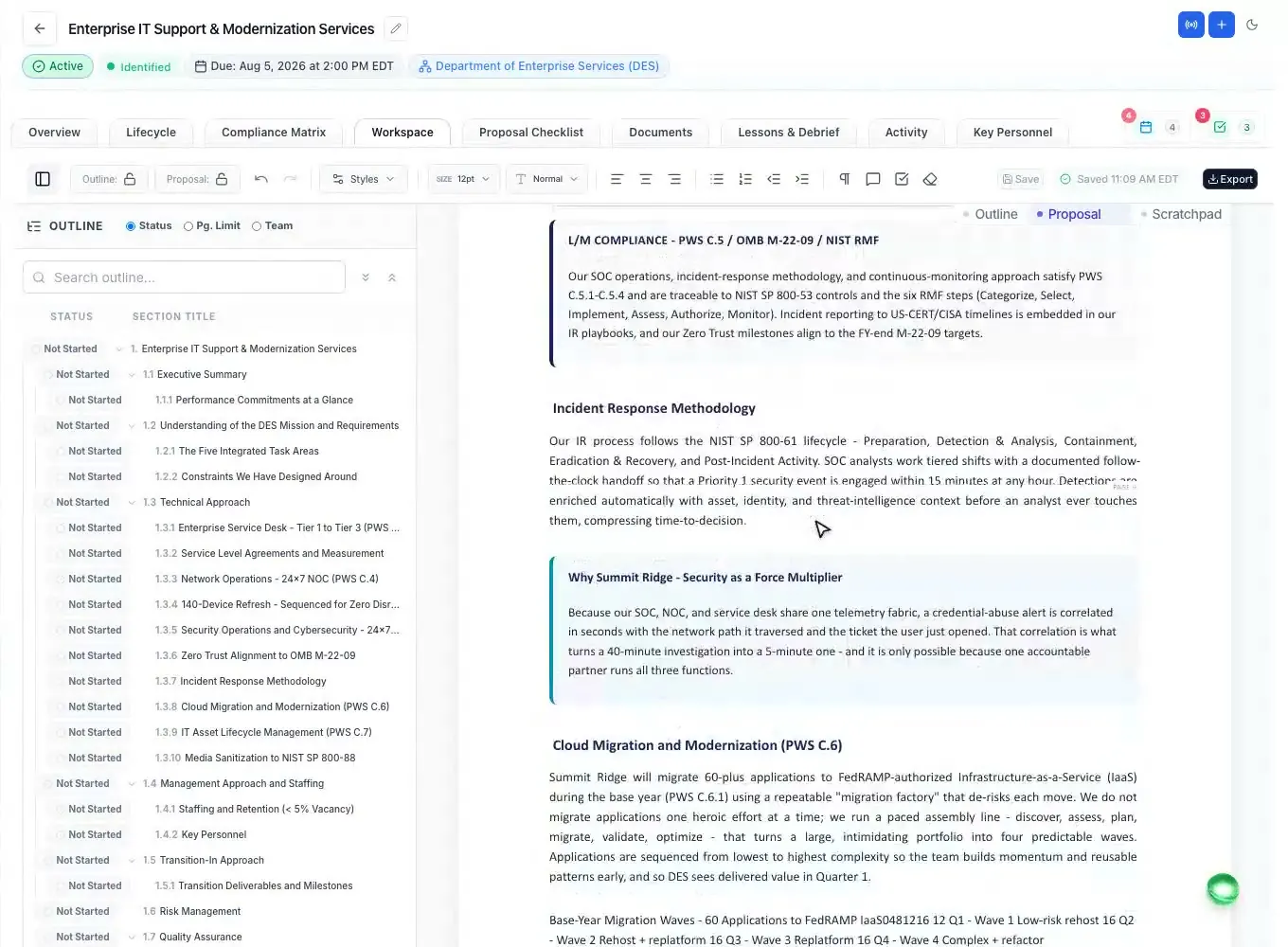
A sample federal Technical Volume drafted in the ProposalWorkspace editor.

The facts

ProposalWorkspace at a glance

Updated

What it is
AI proposal management software in the browser, with an add-in panel inside Microsoft Word, Excel and PowerPoint.
Who it is for
US companies that bid on federal, state and local government contracts (GovCon and SLED) - small businesses, mid-size contractors and proposal teams - and the consultants who work inside a client's workspace.
Not a fit yet for
Work with CUI, or work that needs FedRAMP authorization, a SOC 2 report, enterprise SAML sign-on or a built-in cost volume.
What it covers
Opportunity search, bid/no-bid, capture, RFP analysis, the compliance matrix, the outline, drafting, key personnel, teaming-partner data calls, color team review dates, the submission checklist and the debrief.
Price
Solo $129, Team $449 and Enterprise $1,099 a month, or $99, $359 and $879 a month billed annually. Every plan has every feature.
Free trial
7 days on one proposal with 300 AI credits, and each AI step runs once. No credit card and no sales call. Sign up with your company email - personal addresses such as Gmail are not accepted, and each company gets one trial.
Getting started
Fill the company profile from your website address or a document such as your capability statement, then add the RFP from the SAM.gov or state and local feed, or upload it. The first deliverables run in the background with live progress.
Your own AI assistant
Claude, ChatGPT, Gemini, Microsoft 365 Copilot and Perplexity connect over MCP, on every plan, at no extra charge from us. Your assistant may need its own paid plan, or an admin, to turn connectors on.
Expert help
Advanced Packages built by our proposal team in one business day: one at a time on the Packages page, or 15 with Expert Proposal Kickoff for $4,449 one-time.
The team
ProposalWorkspace is the new home of Fed-Support: the same proposal team, more than 15 years of federal proposal experience, now built into one AI workspace you use every day.

“Our Fed-Support proposal team has more than 15 years of federal proposal experience. ProposalWorkspace puts what we learned into one workspace: every requirement traced to its RFP page, every claim tied to your own records, and your team deciding what goes in.”

Nazim Nashipudi
Founder, ProposalWorkspace

Why it is worth a trial

Eight reasons to choose ProposalWorkspace

ProposalWorkspace shows the RFP page or the Company Library record behind its extractions and drafts, and helps you manage the parts of a bid that can get it disqualified - page limits, key personnel documents, partner inputs and amendments - in the same workspace as the writing. You can try each one in the free trial.

Accuracy

AI drafting that cites the RFP page and your own records

Every ProposalWorkspace extraction cites the RFP page it came from. Drafts are written from your Company Library - past performance, certifications, resumes, win themes - and each claim names the record it came from; a citation that does not match a real record is removed before the draft saves. Where the library has no evidence for something the RFP asks, the draft shows a gap block naming what is missing. AI changes to text you have already written land as tracked changes you accept or reject, and version history can restore an earlier version.

Docs: AI drafting
Compliance

Compliance matrix and outline from Sections L, M and C

The ProposalWorkspace compliance matrix maps each requirement to the Section L instruction, the Section M evaluation language and the Section C, SOW or PWS line at once, with an owner and a compliance status on every row, and exports to Excel or Word. The outline turns every numbered instruction into a heading with the RFP's own wording under it.

See the compliance matrix
Formatting

Page limits and formatting checked in Microsoft Word before you submit

Before you submit, the ProposalWorkspace add-in for Microsoft Word runs twelve checks on the open file - pages over a section's limit, tracked changes and comments left in, font, size and margins against the submission checklist's rules, acronyms and document metadata. The compliance matrix checks the written proposal against every requirement and shows where each one is answered. And before a final-RFP proposal moves to submission, the app asks for a sign-off by someone who did not write it, and records their name and time.

See the Word add-in
Staffing

Key personnel resumes and letters of commitment, in the RFP's format

ProposalWorkspace pulls every key and non-key position from the RFP with its requirements, and generates the job description, the mandated resume format and, when the RFP requires one, the Letter of Commitment as Word files. Each resume is checked requirement by requirement with a pass or fail on the required items - missing facts are marked for the candidate to provide, not filled in. Outside recruiters upload candidates through a secure link with no account, and labor categories show public GSA CALC+ reference ceiling rates matched on title, education and experience.

See key personnel
Teaming

Data calls to teaming partners, through a private link

ProposalWorkspace data calls send each teaming partner a private link - no account needed - to a Word package built from Section L, Section M, the PWS and your outline. Their files land in the proposal's documents, and their answers are checked against the RFP before you write them into the draft.

Docs: data calls
Your own AI

Claude, ChatGPT and other AI assistants inside the workspace (MCP)

Claude, ChatGPT, Gemini, Microsoft 365 Copilot and Perplexity connect to ProposalWorkspace through one connector URL, https://mcp.proposalworkspace.com/mcp, and your ProposalWorkspace login - no API keys - on every plan at no extra charge from us. The assistant works only inside what your role allows: it can search opportunities, read the compliance matrix, write into the outline and create tasks - more than 100 tools in all. It can never change your plan or billing, and tools that run the built-in AI, like outline generation, use your AI credits.

See the AI connector
Q&A and amendments

Questions for the Contracting Officer, and amendments as tracked changes

The ProposalWorkspace Q&A Center finds ambiguities, conflicts and gaps in the RFP and drafts a question for the Contracting Officer on each, linked to its source; you review every question and send it from your own email, and answers in a later amendment are matched back. Each amendment is compared with the base RFP, and every change lands as a tracked change you accept or reject.

Guide: amendments and Q&A
Expert help

Proposal experts who build the outline and matrices for you

When you want experts to build it, the ProposalWorkspace proposal team delivers Advanced Packages - annotated outline, compliance and cross-reference matrices, checklist and a company- and agency-themed cover - each in one business day and checked twice. Buy one at a time on the Packages page, or 15 at once with Expert Proposal Kickoff.

See the packages

Your RFP sets the clock

Start the free trial on the RFP you are bidding now

If your RFP sets a deadline for questions, it falls before the proposal deadline, and questions sent late may go unanswered. Start the 7-day trial on that RFP and the ProposalWorkspace Q&A Center turns the gaps and conflicts it finds into draft questions for the Contracting Officer while you can still send them. The trial covers one proposal, so spend it on a live bid.

what contractors report going into one proposal, on average
84hours
of contractors missed opportunities in 2025 because they found out too late
83%

Source: Deltek Clarity Government Contracting Industry Study, 2026 edition, 917 contractors surveyed.

  1. Start the trial

    7 days on one proposal, 300 AI credits, each AI step once. No credit card and no sales call - sign up with your company email.

  2. Bring the RFP

    Add a notice from the SAM.gov or state and local feed with its attachments, or upload the solicitation you already have.

  3. Get the first deliverables

    Run the opportunity overview, the RFP analysis, the outline, the compliance matrix and the checklist in the background, with live progress.

Want our proposal team to build it instead? Advanced Packages are exclusive: for each solicitation, our team builds them for one company only. See the packages

What it covers

AI proposal software from the first notice to the debrief

ProposalWorkspace runs a federal, state or local proposal from the first notice - a SAM.gov listing or a state or local bid - to the debrief, everything except the cost volume.

What ProposalWorkspace does at each stage of a government proposal
StageWhat ProposalWorkspace doesRead more
Find and decide
Finding federal opportunitiesThe SAM.gov feed, synced daily, with AI keyword search, a 0-100 match score from a published formula and daily saved-search alerts.Opportunity discovery
State and local bidsState and local bids from across the US - state agencies, counties, cities and school districts - with their own notice types (RFP, RFQ, IFB, ITB) in the same workspace.Guide: state and local
Sources sought, RFI and draft RFPBefore the RFP: sources sought, RFI and draft RFP notices each get their own response worksheet, and the pursuit carries over to the final RFP with nothing re-entered.Guide: sources sought
Bid/no-bid decisionsA page-cited go/no-go worksheet and a weighted scorecard (win probability, strategic fit, capability, financial, risk) that recommends GO at 70 and above; any showstopper blocks the bid, and your past decisions pre-fill the next worksheet.Docs: bid/no-bid
Capture planning and win themesCapture work starts before the RFP and carries into it: customer, competition with ghosting and threat ratings, team, and win themes tied to the Section M factor they must win, with a capture signal from At risk to On track.Guide: capture planning
Shred and plan
RFP analysis and shreddingShredding with page citations: an opportunity overview and a deep extraction - evaluation factors, page limits, key dates, key personnel and required forms - with the shall and must statements pulled out word for word.RFP analysis
Compliance matrix (Sections L, M and C)Every requirement mapped to the instruction, the evaluation language and the SOW or PWS line, with owners, a live roll-up and Excel and Word export.Compliance matrix
Proposal outlineAn annotated outline from Section L, Section M and the SOW, with writer guidance and placeholders for resumes, letters and forms.Guide: outline from Section L
Write and format
AI proposal draftingA first draft of every section from the outline and your Company Library, each claim cited to a record you own, with clear markers where input is needed.Docs: AI drafting
Page limits and formatting rulesPer-section page limits in the editor, the formatting and page-limit items on the submission checklist, and a pre-flight check of the open file in Word before you submit.Word add-in
Word and PDF exportFederal heading numbering, document styles, headers and "Page X of Y"; Word (.docx), Word with a table of contents, PDF and Excel.Docs: export and formatting
Questions and amendments
Questions for the Contracting OfficerDrafted from real ambiguities, conflicts and gaps in the RFP, each linked to its source; answers in a later amendment are matched back to the questions.Guide: amendments and Q&A
Solicitation amendmentsEach amendment compared with the base RFP section by section - added, changed and removed - and applied as tracked changes you accept or reject.Guide: amendments and Q&A
Review and team
Color team reviewsPink, Red and Gold Team and Final Review dates on the proposal calendar with reminders, comments in the editor, and a Pass, Warning or Fail check of a drafted section against its requirement.Guide: color team reviews
Key personnel resumesPositions and requirements from the RFP, the mandated resume format, a resume gap review, Letter of Commitment checks and public GSA CALC+ ceiling rates for reference.Key personnel
Data calls to teaming partnersA private portal link per partner for exactly what they owe the proposal.Docs: data calls
Past performanceA past performance library in your company profile, matched to the RFP and cited in the draft.Guide: past performance
Tasks, deadlines and remindersAssignable tasks with reminders 1 and 3 days before they are due, proposal deadlines with a daily reminder email in the last 72 hours, team chat, and voice calls for up to 12 people with AI meeting notes that turn action items into tasks.Collaboration
Submit and learn
SubmissionA checklist built from the RFP, SF form filling that never fills signatures, and a recorded final sign-off, meant for someone who did not write the proposal.Guide: submission checklist
Debriefs and lessons learnedAgency debriefs (FAR 15.506 for federal negotiated buys), AI-drafted lessons for your review, structured win and loss reasons and a Knowledge Library across every bid.Guide: debriefs

Built to be checked

ProposalWorkspace security, and what it does not do yet

ProposalWorkspace isolates each workspace, encrypts your documents and keeps your team in charge of what the AI writes - and it says plainly what it does not have yet.

What is in place today

In place
  • Each workspace is isolated at the data layer, and consultants and teammates never learn which other companies you work with.
  • Documents are encrypted in transit and at rest.
  • Every privileged action is logged with who, when and from where.
  • Sign in with Google or with email and a password; an AI assistant never sees your password.

What it does not do yet

Not yet
  • No FedRAMP authorization and no SOC 2 report - work with CUI, or a prime that requires either, is not a fit yet.
  • No enterprise SAML sign-on (Okta, Microsoft Entra) yet.
  • No cost or price volume module - the GSA CALC+ rates are for reference only.
  • It does not submit the proposal for you - you submit as the solicitation instructs.

If a contract limits which AI providers you may use, ask us which providers the built-in AI uses. support@proposalworkspace.com

Prices on the page

ProposalWorkspace pricing

ProposalWorkspace costs $129 a month for Solo (2 seats), $449 for Team (8 seats) and $1,099 for Enterprise (25 seats), or $99, $359 and $879 a month billed annually. Every plan has every feature; plans differ only by seats and monthly AI credits.

Solo

2 seats

$129a month, billed monthly

Billed annually
$99 a month
Seats
2
AI credits a month
700
Features
Every feature

Team

8 seats

$449a month, billed monthly

Billed annually
$359 a month
Seats
8
AI credits a month
2,500
Features
Every feature

Enterprise

25 seats

$1,099a month, billed monthly

Billed annually
$879 a month
Seats
25
AI credits a month
6,000
Features
Every feature

Prices per month in US dollars, as of October 2026. Extra seats are $69 a month ($55 billed annually) and add 350 AI credits a month each. Cancel any time from your account. The 7-day free trial includes 300 AI credits and needs no credit card. Expert Proposal Kickoff is $4,449 one-time for 15 Advanced Packages; single packages are on the Packages page with no plan required.

Full pricing

Before you choose

ProposalWorkspace FAQ: AI, security, price and fit

Short answers to the questions buyers ask before choosing AI proposal software.

Can AI write a government proposal?

AI can draft one, but a person should own it. ProposalWorkspace drafts every section of the RFP response from your outline and your Company Library, cites the record behind each claim and shows a gap where your records have no evidence. Your team decides: AI changes to your text are tracked changes you approve, and the final check asks someone who did not write the proposal to sign it off before it moves to submission.

Is it allowed to use AI in a government proposal?

For government contracts, generally yes. As of October 2026 we know of no FAR or DFARS clause that bans using AI to write a proposal or requires you to disclose it. Agency rules and individual solicitations can add their own AI questions, often about AI in the work you deliver, so read the instructions. Grants differ: NIH will not consider applications substantially developed by AI. Your company is responsible for every statement, which is why ProposalWorkspace shows its sources and your team decides what goes in.

Is it safe to put an RFP and company data into an AI tool?

It depends on where the data goes. In ProposalWorkspace, each workspace is isolated at the data layer, documents are encrypted in transit and at rest, and ProposalWorkspace does not build, train or fine-tune any AI model on your content. The built-in AI runs on commercially available models through business API services, not consumer chat products. ProposalWorkspace has no FedRAMP authorization and no SOC 2 report, so it is not a fit yet for work with CUI. If a contract limits which AI providers you may use, ask us which providers the built-in AI uses.

Should we hire a proposal consultant or buy proposal software?

Hire a consultant for judgment you do not have in house - capture strategy, win themes, a Red Team. Use software for the work that repeats on every bid - the shred, the compliance matrix, the outline, resumes and partner inputs; ProposalWorkspace Solo is $129 a month with every feature. You can use both: invite a consultant into one proposal with view or edit access that ends on the date you set - it uses one of your seats while active - and they never see your other pursuits. When you want experts to build the outline and matrices, the ProposalWorkspace proposal team delivers Advanced Packages in one business day.

Is ProposalWorkspace a good fit for a small business?

Yes, ProposalWorkspace fits small businesses that bid on federal, state or local contracts. Solo covers two people for $129 a month with every feature, and the free proposal guides explain SAM.gov registration, NAICS codes and set-asides in plain words. If your work involves CUI or needs FedRAMP or SOC 2, it is not a fit yet.

Does ProposalWorkspace work for state and local government bids?

Yes. ProposalWorkspace brings in state and local (SLED) bids from across the US - state agencies, counties, cities and school districts - with their own notice types and match score, and a state pursuit runs through the same workspace as a federal one. You can also start a proposal by uploading a solicitation you found yourself.

Which AI assistants work with ProposalWorkspace?

Claude, ChatGPT, Gemini, Microsoft 365 Copilot, Perplexity and other assistants that support MCP connectors work inside ProposalWorkspace through one connector URL and your ProposalWorkspace login, on every plan at no extra charge from us. Your assistant may have its own requirements: ChatGPT, Perplexity and Claude allow custom connectors on their paid plans, and Gemini or Microsoft 365 Copilot are connected once by your workspace admin. The built-in AI needs no setup and no API keys.

What happens when the ProposalWorkspace trial ends?

Your work stays readable and is kept for at least 30 days. Creating and editing pause until you choose a plan, and nothing is charged because no card was collected.

ProposalWorkspace

Ready when the next RFP drops.

Set up in minutes

Free trial, no credit card. Claude connector included.